 Finance · UAE Weekly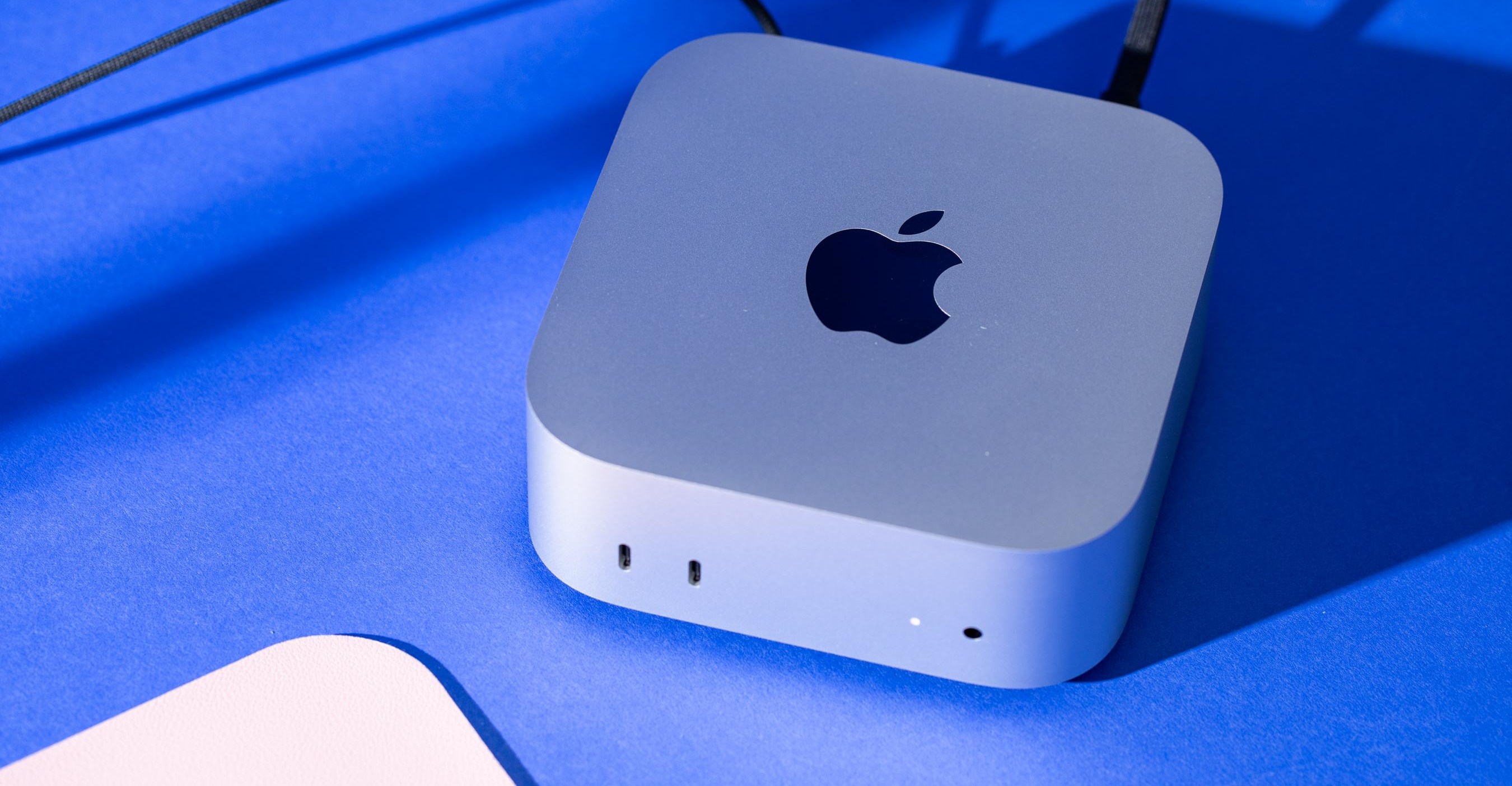
There are lots of compact desktop computers out there, but none match the Mac Mini’s small size and big power. 2024’s redesign reduced the Mini to 0.82L, a chassis so minimal you can easily mount it behind a monitor or under a desk. I’ve used gaming laptop charging bricks that are nearly as large and definitely heavier than this whole computer. But despite being tiny, the Mini maintains a bunch of speedy ports — even a front-facing headphone jack.
The 2026 Mini is the first Mac to get Apple’s new M6 chip , with more cores — and more kinds of cores — than the outgoing M4 model. Along with that comes another beefier version, replacing the M4 Pro model with an M5 Pro . It’s a chip bump year, and that’s just fine.
But it’s also a price bump year: while the M4 Mac Mini started at $599, the new model starts at $899. In spite of that, the Mac Mini remains the best value in the Mac lineup, because just about everything costs more these days . 9 Verge Score $899 The Good M6 chip is more than enough for most people Same great, tiny chassis Lots of ports The Bad $300 higher starting price over the old base M4 model Speakers are still “Well, better than nothing” Still wish it had an SD card slot 8 Verge Score $1699 The Good M5 Pro packs lots of power in such a small form factor Lots of ports, including Thunderbolt 5 Super fast storage read / write speeds The Bad More expensive than last year and gets ludicrous — to the point when you should just buy a Mac Studio Speakers are still “Well, better than nothing” I especially wish the M5 Pro model had an SD card slot Since May, the cheapest M4 Mini was the model with 512GB storage, for $799; Apple discontinued the $599 model with 256GB of storage due to supply constraints — in part because of people buying up Mac Minis en masse for use with OpenClaw . So while the base M6 model with 16GB / 256GB is technically only $100 more than the last available M4 Mini, it’s really a $300 increase.
Component report card Screen: BYO Webcam: BYO Keyboard: BYO Trackpad: BYO Port selection: A Speakers: D Number of ugly stickers to remove: 0 We have two specced-up units in for review. One is a $1,299 M6 model with a 12-core CPU / 12-core GPU, 24GB of unified memory, 512GB of storage, and 2.5Gb ethernet. The M5 Pro config is a very pricey $2,899 for an 18-core CPU / 20-core GPU, 48GB of RAM, 1TB SSD, and 10Gb ethernet.
As powerful as the M5 Pro is, this is a bit overkill for a Mac Mini. Spending $2,899 puts you well into M5 Max Mac Studio territory. Like all the latest M-series Macs, both the M6 and M5 Pro Mac Mini are absolute speed demons for raw performance.
They even benefit from Apple’s recent push to faster storage, doubling the storage speeds of the M4 / M4 Pro Mac Mini. The M6 is Apple’s newest chip, and it’s now the head of the pack in single-core performance. Not just the Mac pack, either; the entire pack.
The M6 chip’s jump to a 12-core CPU and 12-core GPU over the M4’s 10-core / 10-core makes it faster on all fronts. The M6 contains all three of Apple’s current core types: 2 super, 4 performance, and 6 efficiency. (The super cores are the fastest ones, which Apple called performance cores until earlier this year ; the performance cores are new and meant for multithreaded work.) The M4 had four of the old performance cores and six efficiency cores. The M5 Pro Mac Mini has six super cores, twelve performance cores, and zero efficiency cores.
In single-threaded work, the M6’s super cores are about 10 percent faster than M5’s performance cores, and a little more than 20 percent faster than the performance cores in the M4. The super and performance cores in the M5 Pro are both slower than the M6’s, and so are the GPU cores, but what they lack in speed they make up for in number, not to mention memory bandwidth. The M5 Pro is 40 to 50 percent faster in multi-threaded CPU and GPU benchmarks than the M6.
It’s just so dang tiny . Looking at a real-world benchmark like our Adobe Premiere 4K export test, the M6 Mac Mini finishes in 2 minutes and 34 seconds — 40 seconds faster than the M4 we tested in the iMac with the same amount of RAM. The M5 Pro did it in 1:51, almost a third faster than the M6 and even faster than our recent re-test of the 10-core / 32-core M1 Max (which took 2:03).
Mac Mini (2026) / Apple M6 / 24GB / 512GB Mac Mini (2026) / Apple M5 Pro / 48GB / 1TB / 10G Ethernet iMac (2024) / Apple M4 / 24GB / 1TB MacBook Pro 16 / Apple M4 Pro / 48GB / 2TB MacBook Pro 14 / Apple M5 / 16GB / 1TB MacBook Air 15 / Apple M5 / 16GB / 1TB Razer Blade 16 (2025) / AMD Ryzen AI 9 HX 370 / RTX 5090 / 32GB / 2TB Asus Zenbook Duo / Intel Core Ultra X9 388H (Panther Lake) / 32GB / 1TB CPU cores 12 18 10 14 10 10 12 16 Graphics cores 12 20 10 20 10 10 10496 (CUDA) 12 Geekbench 6 CPU Single 4653 4294 3777 3976 4208 4175 2968 3009 Geekbench 6 CPU Multi 21005 29104 14756 22615 17948 16567 15922 17268 Geekbench 6 GPU (OpenCL) 61462 88531 35958 70018 49059 47661 213016 56839 Geekbench 6 GPU (Metal) 99620 142708 55160 113600 77595 76035 N/A N/A Geekbench 7 CPU Single 4034 3675 - - - - - - Geekbench 7 CPU Multi 22450 34021 - - - - - - Geekbench 7 GPU (OpenCL) 57560 88763 - - - - - - Geekbench 7 GPU (Metal) 89613 137117 - - - - - - Cinebench 2026 Single 809 715 - - 736 727 - 528 Cinebench 2026 Multi 5533 8059 - - 4486 3413 - 3993 PugetBench for Photoshop 16739 17726 10248 12374 12354 11513 8679 8773 PugetBench for Premiere Pro (2.0.0+) 75108 105041 - - 71122 61861 - 54920 PugetBench for DaVinci Resolve (2.0.0+) 61549 85624 - - 50882 45378 - - Blender classroom test (seconds, lower is better) 33 24 65 - 44 46 18 61 Blender cosmos test (seconds, lower is better) 84 51 - - - - 121 204 Premiere 4K Export (lower is better) 2 minutes, 34 seconds 1 minute, 51 seconds 3 minutes, 14 seconds 2 minutes, 13 seconds 2 minutes, 47 seconds 2 minutes, 53 seconds 1 minute, 56 seconds 3 minutes, 3 seconds Sustained SSD reads (MB/s) 6759.86 12218.07 3252.89 6737.84 7049.45 7049.45 6726.25 6762.15 Sustained SSD writes (MB/s) 7537.38 15420.95 3393.39 7499.56 7317.6 7480.55 4931.41 5679.41 Price as tested $1,299 $2,899 $2,299 $3,349 $1,949 $1,499 $4,499.99 $2,299.99 What does all of this feel like in everyday use? These Mac Minis are more than capable for lots of multitasking and content creation, with the M5 Pro of course having more headroom. I was able to import a batch of 1,253 50-megapixel RAW images (all my recent photos still living on my SD card) from my full-frame Sony camera into Lightroom Classic on the M6 Mac Mini in about 6 minutes and 13 seconds.
The same import only went about 30 seconds faster on the M5 Pro Mac Mini. But doing some heavy batch editing with AI subject detection across a selection of 188 photos showed the performance advantage of the M5 Pro. The M6 Mac Mini was decently fast, but even with 24GB of RAM this little torture test hit swap memory and slowed mid-processing.
The M5 Pro sailed through and stayed speedier the whole way through. The M5 Pro model should come in black. If you’re doing video editing, visual effects, or 3D rendering then you’re best served looking at the M5 Pro Mac Mini — or maybe even the Mac Studio if you have the budget.
The M6 Mac Mini is more for generalists who do creative work on the side or want an everyday desktop they could use for a very long time, like up to a decade. When I bought a Mac Mini for myself in 2023 I opted for the cheapest M2 Pro. (Yes, I’m plenty jealous of how small the current models are.) It served me well, but these days I’d probably be fine with an M6 Mac Mini. While I often deal with lots of high-res images in Lightroom Classic, photography isn’t my full-time work.
If I were editing thousands of photos for hours a day I’d definitely consider the M5 Pro Mac Mini or M5 Max Mac Studio — and then I’d also get my precious SD card slot. And yes, the Mac Minis are great for local AI compute, thanks in part to fast unified memory, and Apple’s leaning into that with the new models. The press release announcing the M6 and M5 Pro chips mentions AI capabilities nearly 40 times. 1/2 Lots of ports.
Hardware-wise, these Mac Minis are nearly identical to the older ones. They have the same ports as the last-gen model, with two 10Gbps USB-C ports and a headphone jack on the front. On the rear, there are three Thunderbolt ports (TB4 on the M6 model; TB5 on the M5 Pro), plus HDMI 2.1 and an ethernet port.
The ethernet has been bumped from 1 gigabit to 2.5Gbps; you can upgrade to 10Gb for $100. Sure, the power button is still on the bottom , but it remains mostly no big deal since the Mini is designed to sip power when idle; you can just put it to sleep instead of turning it off. Apple even added a software feature to somewhat alleviate this by having the Mac Mini turn itself back on after the power is cut.
The other thing that’s still the same are the Mac Mini’s crummy little speakers. I’ve owned and used the older, larger M2 Pro Mac Mini for years so I know how you can get by with the built-in speakers when you’re too lazy to put on headphones, but they should only be relied on for hearing the beeps, boops, and “knock brushes” of notifications. There’s now Wi-Fi 7 and Bluetooth 6 support on the 2026 Mac Minis, which is a nice small upgrade.
Just like annual phone releases, the new Mac Mini will best serve newcomers and people still running much older models. Do you still have an Intel-based Mac that’s now run out of OS updates with the introduction of macOS 27 Golden Gate? Boy, are you in for a treat.
On the software side, I feel the same way about macOS 27 Golden Gate as I did during the developer beta : the visual refinements that tone down Liquid Glass transparency, increase window sidebar legibility, and fix window corner radii are all welcome changes. Golden Gate is an overall nice improvement over macOS 26 Tahoe, even if Siri AI and Apple Intelligence on the Mac are just kinda Fine . The bottom power button remains weird, but it’s rarely an issue.
It could pose a problem if you mount the Mini somewhere hard to reach. Since this year’s upgrade to the Mac Mini is mostly a chip bump, it’s of course a bummer it’s much more expensive. But then again, so is everything else these days.
RAMageddon shows no mercy for any manufacturer. Apple’s computers are pricier . Intel and AMD chip costs are rumored to rise soon.
Laptops are launching at one price and then changing shortly after . In terms of mini PCs, Minisforum raised its prices and the Framework Desktop is more expensive now than when it launched last year . There are cheaper mini PCs, and there are smaller ones, but none of them truly compete with the Mac Mini’s balance of performance, price, and size — even with the price increase. (Gaming is a different story, of course.) This is our new normal.
The Mac Mini is still a great deal; it just doesn’t feel like the steal it used to be. But with the recent price increases hitting MacBook Airs and MacBook Pros, the new Mac Minis remain much cheaper than getting similar chips in a laptop (especially if you already have a monitor, mouse, and keyboard). The base M6 Mac Mini is $400 cheaper than the cheapest M5 MacBook Air, and the base M5 Pro model is $800 less than the MacBook Pro with the same chip and memory.
Sadly it doesn’t seem likely we’ll ever see a Mac Mini start at a price like $599 ever again. It’s still an easy recommendation if you want a tiny desktop computer that runs circles around comparably priced PCs and will last for years, but it’ll take time to forget the gut punch that is these price increases. M6 / M5 Pro Mac Mini specs (as reviewed) CPU (M6): Apple M6 (12-core CPU / 12-core GPU) CPU (M5 Pro): Apple M5 Pro (18-core CPU / 20-core GPU) Unified memory (M6): 24GB Unified memory (M5 Pro): 48GB Storage (M6): 512GB SSD Storage (M5 Pro): 1TB SSD Connectivity: Wi-Fi 7, Bluetooth 6 Ports (M6): 2x USB-C (10Gbps), 3x Thunderbolt 4 / USB-C (DisplayPort 1.4), 1x HDMI 2.1, RJ45 2.5Gb ethernet, AC power Ports (M5 Pro): 2x USB-C (10Gbps), 3x Thunderbolt 5 / USB-C (DisplayPort 2.1), 1x HDMI 2.1, RJ45 10Gb ethernet, AC power Weight (M6): 1.5 pounds / 0.67kg Weight (M5 Pro): 1.6 pounds / 0.73kg Dimensions: 5 x 5 x 2 inches / 127 x 127 x 50mm Price (M6): $1,299 Price (M5 Pro): $2,899 Follow topics and authors from this story to see more like this in your personalized homepage feed and to receive email updates.
Antonio G. Di Benedetto
Source: The Verge